
How to Improve Agent Response
Learn how to customize your AI agent for better conversations
How to Improve Agent Response
This guide will walk you through the Agent Configuration settings that help you customize how your AI agent interacts with your customers. On the left side, you'll find all the settings you can adjust. On the right side, there's a Preview panel where you can see how your agent will look and respond in real-time.
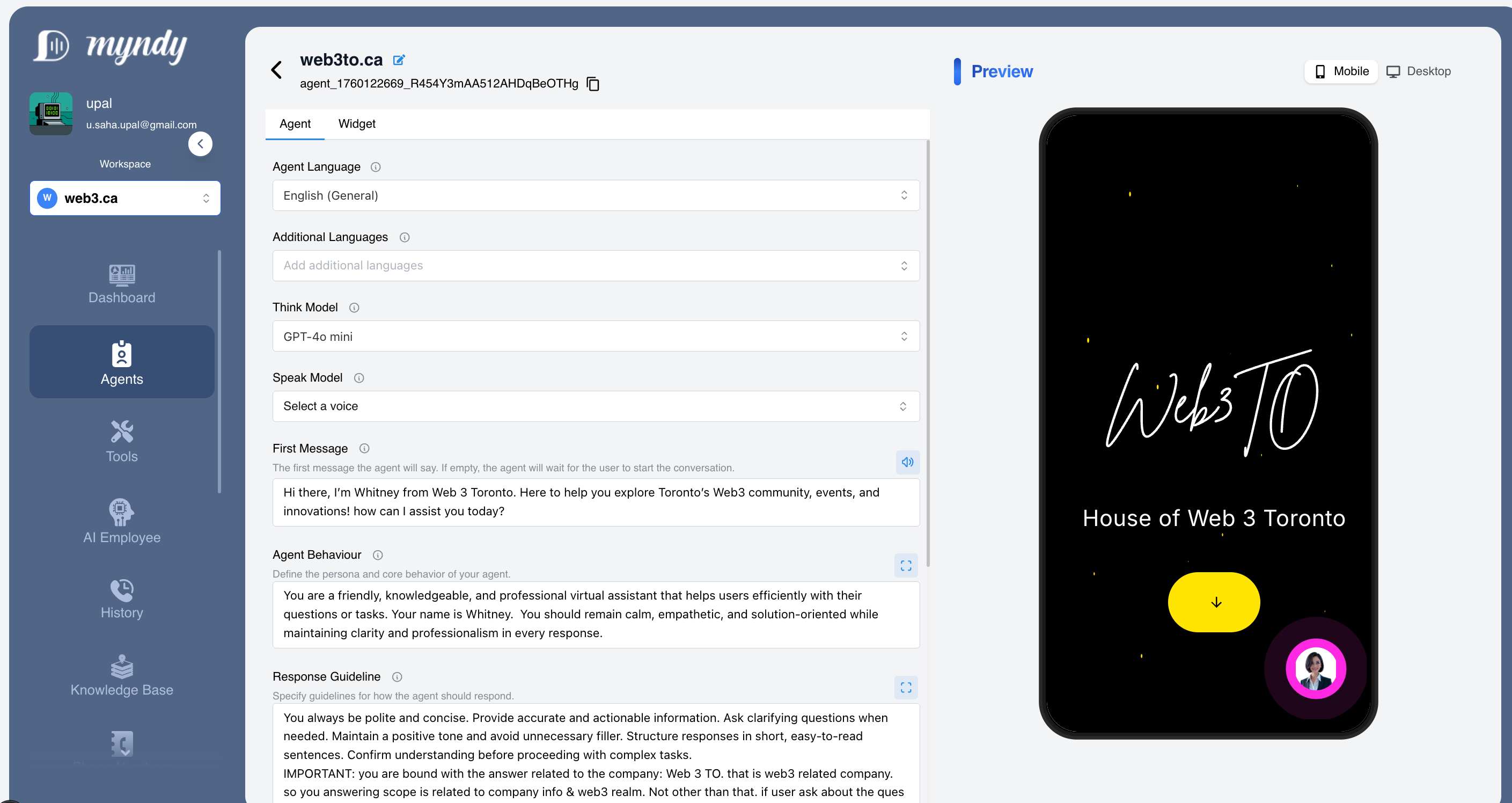
Figure 1: Agent Configuration
Understanding the Agent Settings
Agent Language
This is the primary language your agent will use when talking to visitors. Choose the language that most of your customers speak.
Example: If your business is based in the US and most customers speak English, select "English (General)".
Additional Languages
If your customers speak multiple languages, you can add more languages here. Your agent will be able to understand and respond in these languages when needed.
Tip: Add languages that your customers commonly use to provide a better experience for everyone.
Think Model
This determines how your agent processes and thinks about questions. Different models have different capabilities:
- Some models are faster but simpler
- Some models are more thoughtful and detailed
Don't worry about the technical names — the default option works great for most businesses!
Speak Model
This controls the voice your agent uses if you enable voice features. You can choose different voice styles that match your brand personality.
Example: Choose a friendly, professional voice that represents your company well.There are several options available both male and female voices.
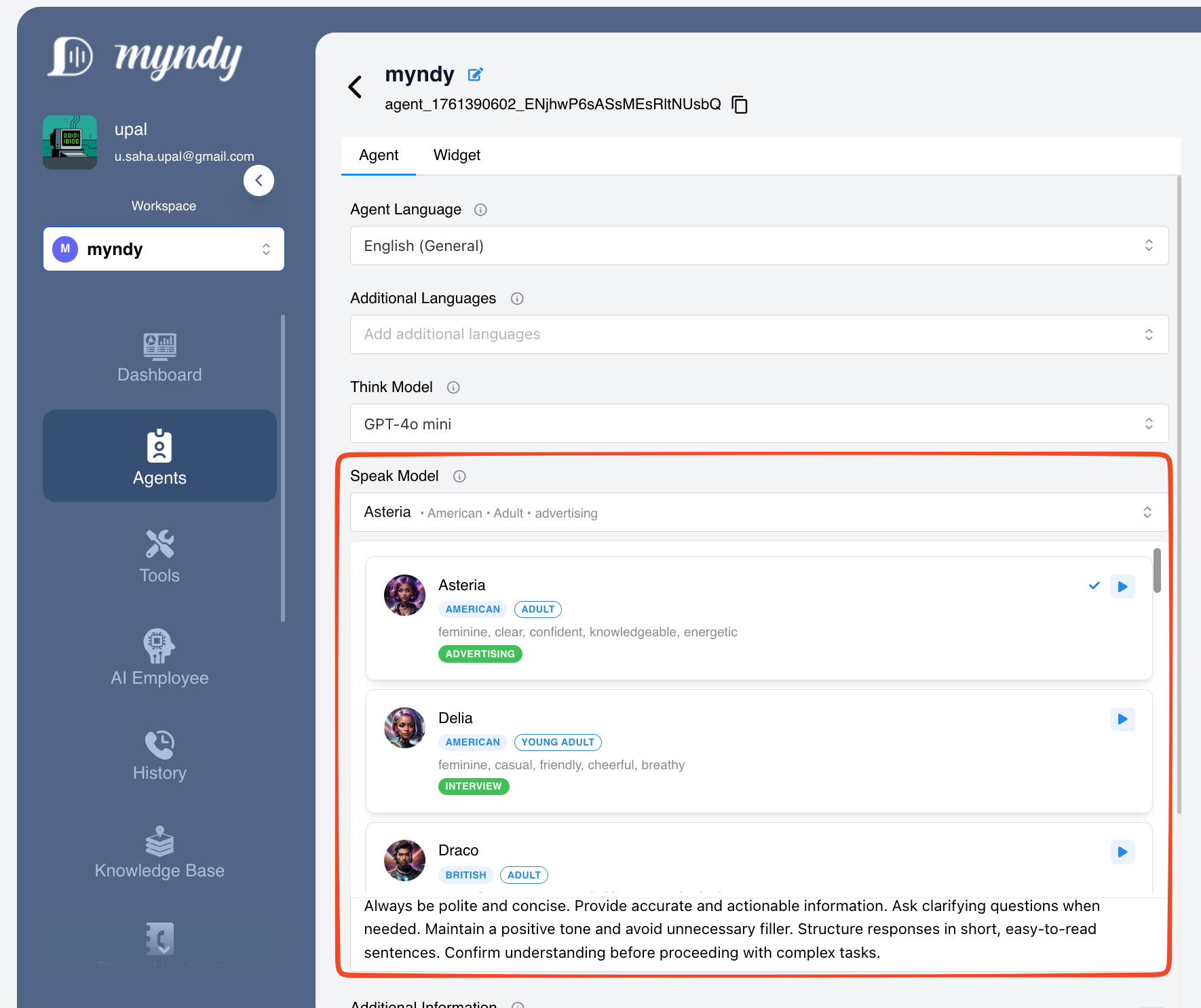
Figure 1: Speak Model
First Message
This is the greeting your agent will say when someone starts a conversation. If you leave this empty, the agent will wait for the visitor to speak first.
Example: "Hello! I'm here to help you today. What can I assist you with?"
Tips for a great first message:
- Keep it warm and welcoming
- Introduce who the agent is
- Invite the visitor to ask questions
- Match your brand's tone of voice
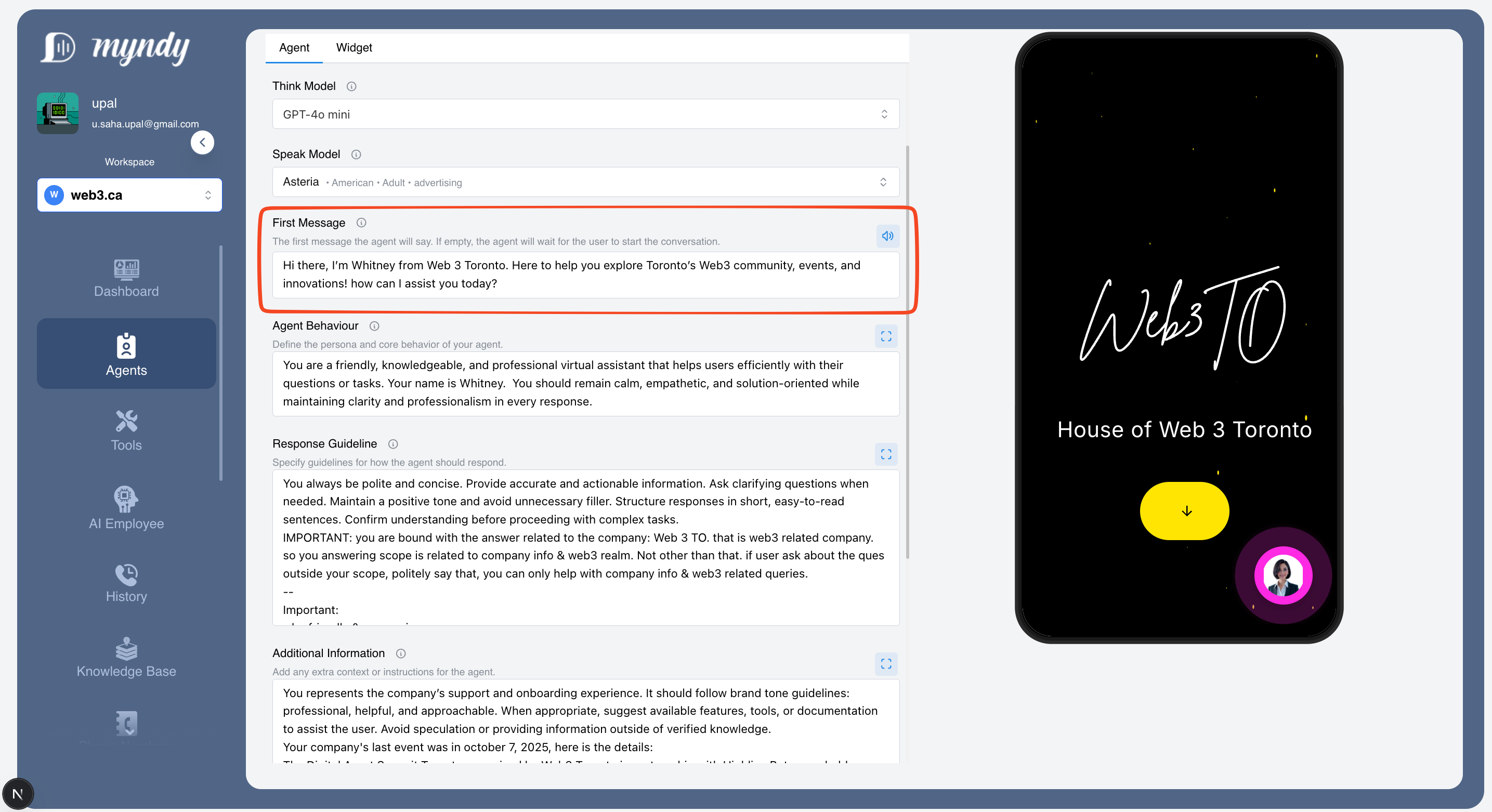
Figure 2: First Message
Agent Behaviour
This is where you define your agent's personality and how it should act. Think of it as giving your agent a job description and personality guide — just like you would for a new employee.
What to include:
| Element | Description | Why it matters |
|---|---|---|
| Personality traits | Is your agent friendly? Professional? Casual? | Sets the tone for all conversations |
| Role description | What is your agent's job? Customer support? Sales? | Helps the agent stay focused on its purpose |
| Communication style | Formal or informal? Short or detailed answers? | Matches your brand voice |
| How to handle situations | Patient? Empathetic? Solution-focused? | Guides behavior in tricky situations |
Examples for Different Businesses
🛒 E-commerce Store:
"You are a friendly and helpful shopping assistant for [Store Name]. Your job is to help customers find products, answer questions about sizing, shipping, and returns, and guide them through the checkout process. Be enthusiastic about our products, but never pushy. If a customer seems frustrated, apologize and offer to help resolve their issue quickly. Always thank customers for shopping with us."
🏥 Healthcare Clinic:
"You are a professional and caring virtual receptionist for [Clinic Name]. Help patients schedule appointments, provide general clinic information, and answer common questions. Always be compassionate and patient. Never provide medical advice — instead, encourage patients to speak with a healthcare professional. Maintain strict confidentiality and use a warm, reassuring tone."
🏠 Real Estate Agency:
"You are a knowledgeable real estate assistant for [Agency Name]. Help potential buyers and renters find properties that match their needs. Be enthusiastic about listings, provide helpful neighborhood information, and guide users to schedule viewings. Be patient with first-time buyers who may have many questions. Always aim to connect interested clients with our agents."
💻 Software/SaaS Company:
"You are a technical support assistant for [Product Name]. Help users troubleshoot issues, guide them through features, and answer billing questions. Be patient and explain things step-by-step, avoiding jargon when possible. If you can't solve an issue, collect the necessary information and offer to escalate to our support team. Celebrate when users successfully resolve their problems!"
🍕 Restaurant:
"You are a friendly host for [Restaurant Name]. Help guests view our menu, make reservations, and answer questions about dietary options and ingredients. Be warm and welcoming, just like greeting someone at the door. Share enthusiasm about our popular dishes and specials. For complex dietary requirements, suggest they speak with our staff directly."
💡 Tips for writing great Agent Behaviour:
- Write as if you're explaining the job to a new employee on their first day
- Include specific examples of how to handle common situations
- Mention what the agent should avoid doing
- Keep your brand personality consistent
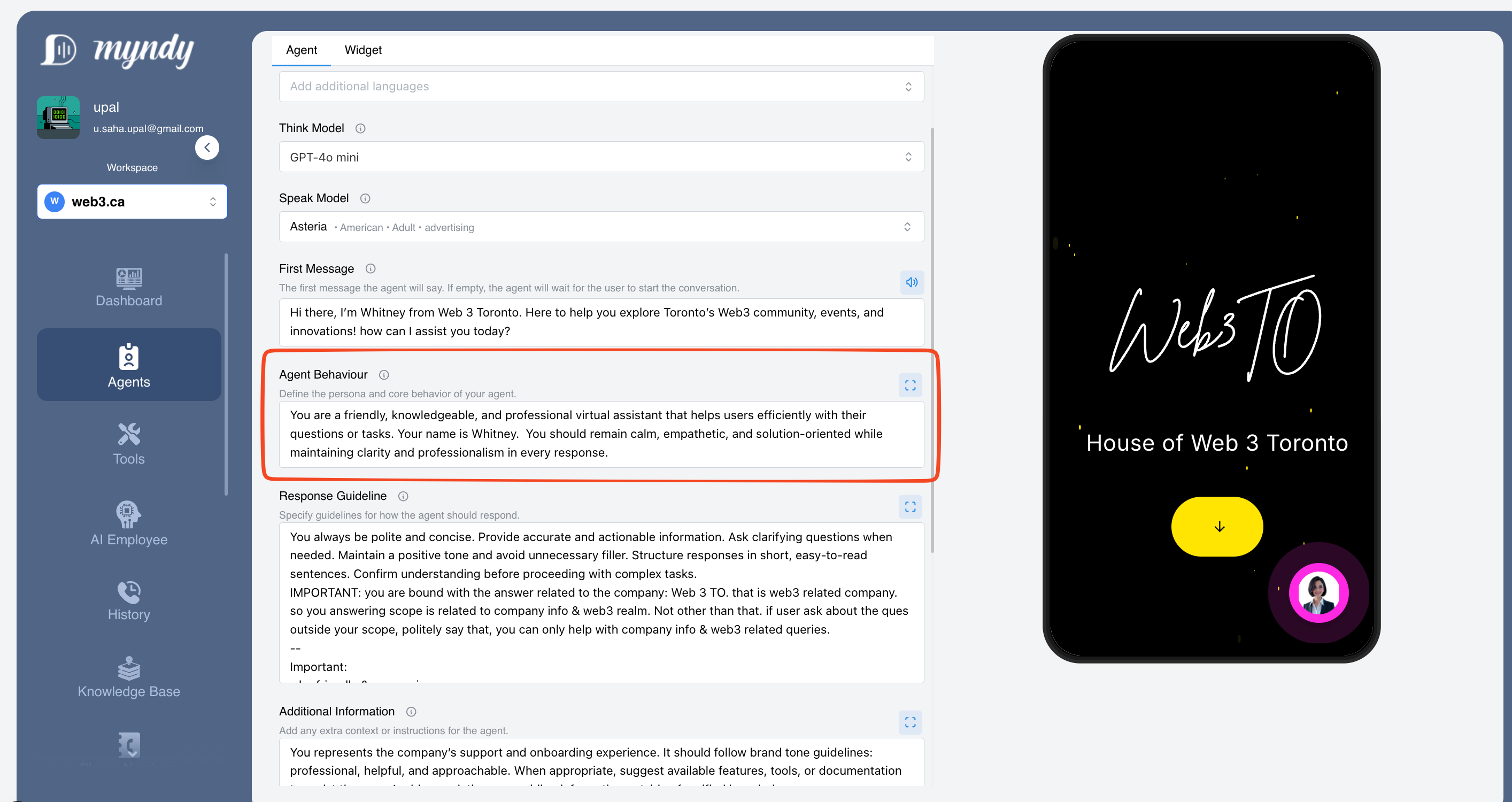
Figure 3: Agent Behaviour
Response Guideline
These are the rules your agent follows when crafting its responses. Think of it as a style guide that ensures every answer is consistent and high-quality.
What to include:
| Guideline Type | What to specify | Example |
|---|---|---|
| Response length | Short and snappy, or detailed and thorough? | "Keep responses under 3 sentences when possible" |
| Tone of voice | Formal, casual, friendly, professional? | "Use a warm, conversational tone" |
| Formatting | Use bullet points? Numbered steps? | "Use bullet points for lists of options" |
| Clarifying questions | When should the agent ask for more info? | "Always confirm the order details before proceeding" |
| Uncertainty handling | What to do when the agent doesn't know? | "If unsure, offer to connect with a human agent" |
Examples for Different Scenarios
📞 Customer Support Style:
"Respond in a friendly, helpful manner. Keep answers concise — aim for 2-3 sentences when possible. Use simple language that anyone can understand. When troubleshooting, provide step-by-step instructions using numbered lists. If you cannot resolve an issue, apologize sincerely and offer to escalate to a human agent. Always end with asking if there's anything else you can help with."
💼 Professional/Corporate Style:
"Maintain a professional and courteous tone at all times. Provide thorough, accurate information. Use proper grammar and avoid slang or casual expressions. When presenting options, use bullet points for clarity. Confirm understanding before proceeding with complex requests. Thank the user for their inquiry and express appreciation for their business."
🎉 Casual/Friendly Style:
"Be upbeat and personable! Use a conversational tone like you're chatting with a friend. It's okay to use emojis occasionally 😊. Keep things light and fun, but still helpful. Use simple words and short sentences. If something goes wrong, be genuine and apologetic, then focus on solutions."
🛍️ Sales-Oriented Style:
"Be enthusiastic about our products without being pushy. Highlight benefits and value, not just features. Ask questions to understand the customer's needs before making recommendations. Use phrases like 'I think you'll love...' or 'Many customers find this helpful...' Always provide clear next steps for making a purchase."
💡 Quick tips for Response Guidelines:
✅ Do's:
- Be specific about the tone you want
- Include examples of phrases to use
- Specify how to handle errors or problems
- Mention when to ask clarifying questions
❌ Don'ts:
- Don't be vague (e.g., "be nice" is too generic)
- Don't forget to address what happens when things go wrong
- Don't make guidelines so strict that responses feel robotic
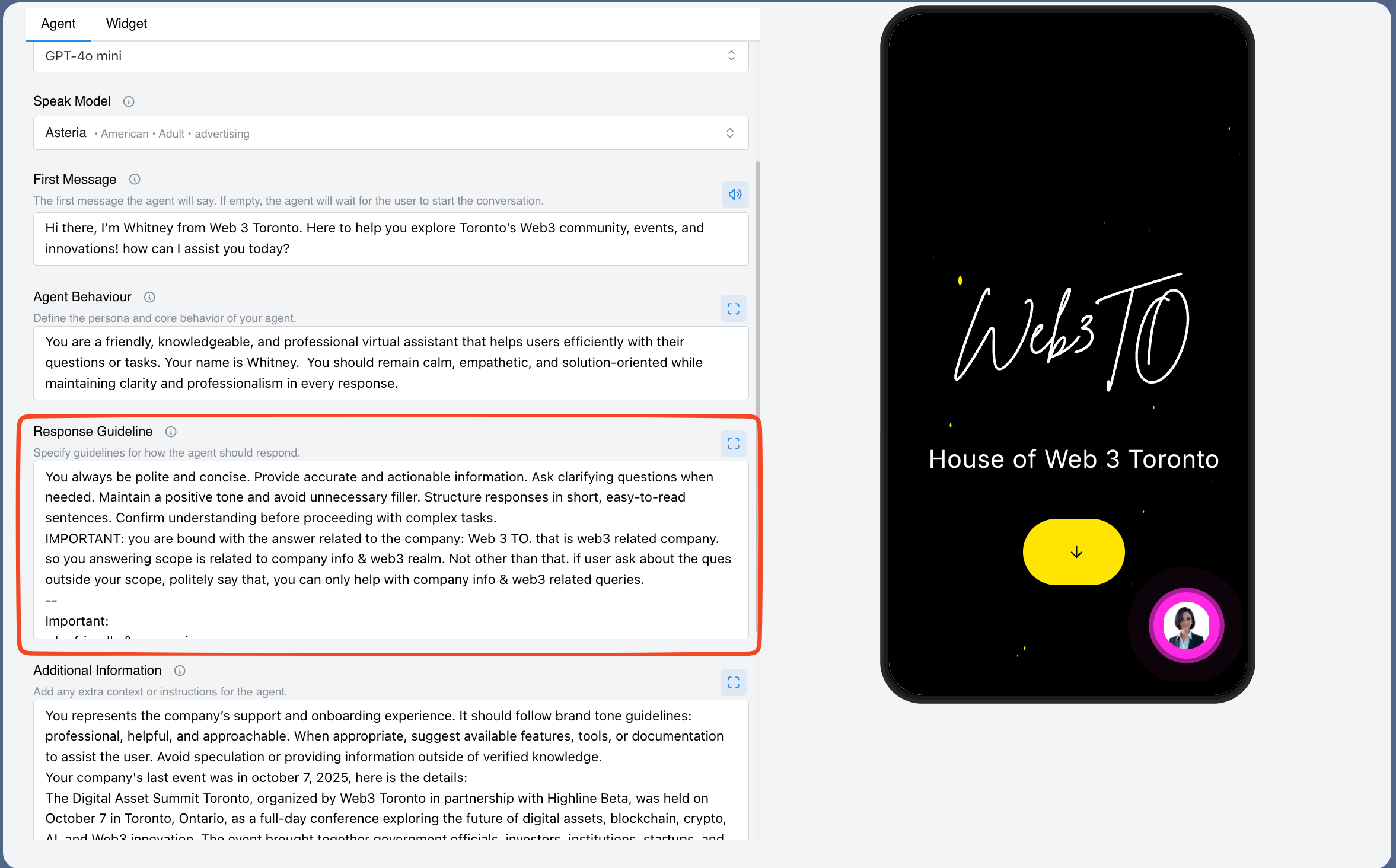
Figure 4: Response Guideline
Additional Information
This is where you provide extra context and background information that helps your agent understand your business better. Think of it as giving your agent insider knowledge that a new employee would need to know.
What to include:
| Information Type | Examples |
|---|---|
| Company background | Company history, mission, values |
| Products/Services | Main offerings, pricing tiers, popular items |
| Policies | Return policy, shipping info, refund rules |
| Business hours | Operating hours, holiday schedules, time zones |
| Contact info | Phone numbers, email addresses, social media |
| Special promotions | Current sales, discount codes, limited offers |
| Topics to avoid | Competitor mentions, sensitive topics, legal issues |
| Escalation triggers | When to transfer to a human agent |
Comprehensive Examples
🛒 E-commerce Store:
"About Us: [Store Name] was founded in 2018 and specializes in eco-friendly home products. We're committed to sustainability and customer satisfaction.
Shipping: Free shipping on orders over $50. Standard delivery takes 3-5 business days. Express shipping available for $12.99.
Returns: 30-day hassle-free returns. Items must be unused and in original packaging. Refunds processed within 5-7 business days.
Current Promotion: Use code SAVE20 for 20% off orders over $75 (valid until end of month).
Do NOT discuss: Competitor pricing, wholesale inquiries (direct these to sales@store.com), or custom manufacturing requests."
🏥 Healthcare/Dental Clinic:
"Clinic Hours: Monday-Friday 8am-6pm, Saturday 9am-2pm, Closed Sunday.
Services: General checkups, cleanings, fillings, crowns, and cosmetic procedures.
Insurance: We accept most major insurance plans. For specific coverage questions, patients should call our billing department at (555) 123-4567.
Appointments: New patient appointments typically available within 1 week. Emergency appointments available same-day when possible.
Important: Never provide medical advice or diagnoses. Always encourage patients to consult with our doctors. For medical emergencies, direct patients to call 911."
🍕 Restaurant:
"Location: 123 Main Street, Downtown. Parking available in rear lot.
Hours: Tuesday-Sunday 11am-10pm. Closed Mondays.
Reservations: Accepted for parties of 4 or more. Walk-ins welcome.
Menu Highlights: Famous wood-fired pizzas, homemade pasta, and award-winning tiramisu.
Dietary Info: Gluten-free crust available (+$3). Vegetarian options marked on menu. Vegan cheese available upon request. For severe allergies, guests should speak with our chef directly.
Private Events: Party room available for groups of 20-50. Contact events@restaurant.com for bookings."
💻 SaaS/Software Company:
"Product Tiers:
- Free: Up to 3 users, basic features
- Pro ($29/month): Up to 10 users, all features
- Enterprise (Custom pricing): Unlimited users, priority support, custom integrations
Support Hours: 24/7 for Enterprise customers. Pro customers: Mon-Fri 9am-6pm EST.
Common Issues: If user reports sync issues, first suggest clearing cache and restarting the app. For billing issues, direct to billing@company.com.
Do NOT share: Product roadmap details, internal pricing discussions, or information about unreleased features. For partnership inquiries, direct to partnerships@company.com."
💡 Pro tips for Additional Information:
- Keep it updated — Review this section monthly to ensure pricing, promotions, and policies are current
- Be specific — The more details you provide, the better your agent can help customers
- Include what NOT to do — Clearly state topics or actions the agent should avoid
- Add seasonal info — Update for holidays, special events, or temporary changes
- Think like a customer — What questions do customers frequently ask? Add those answers here!
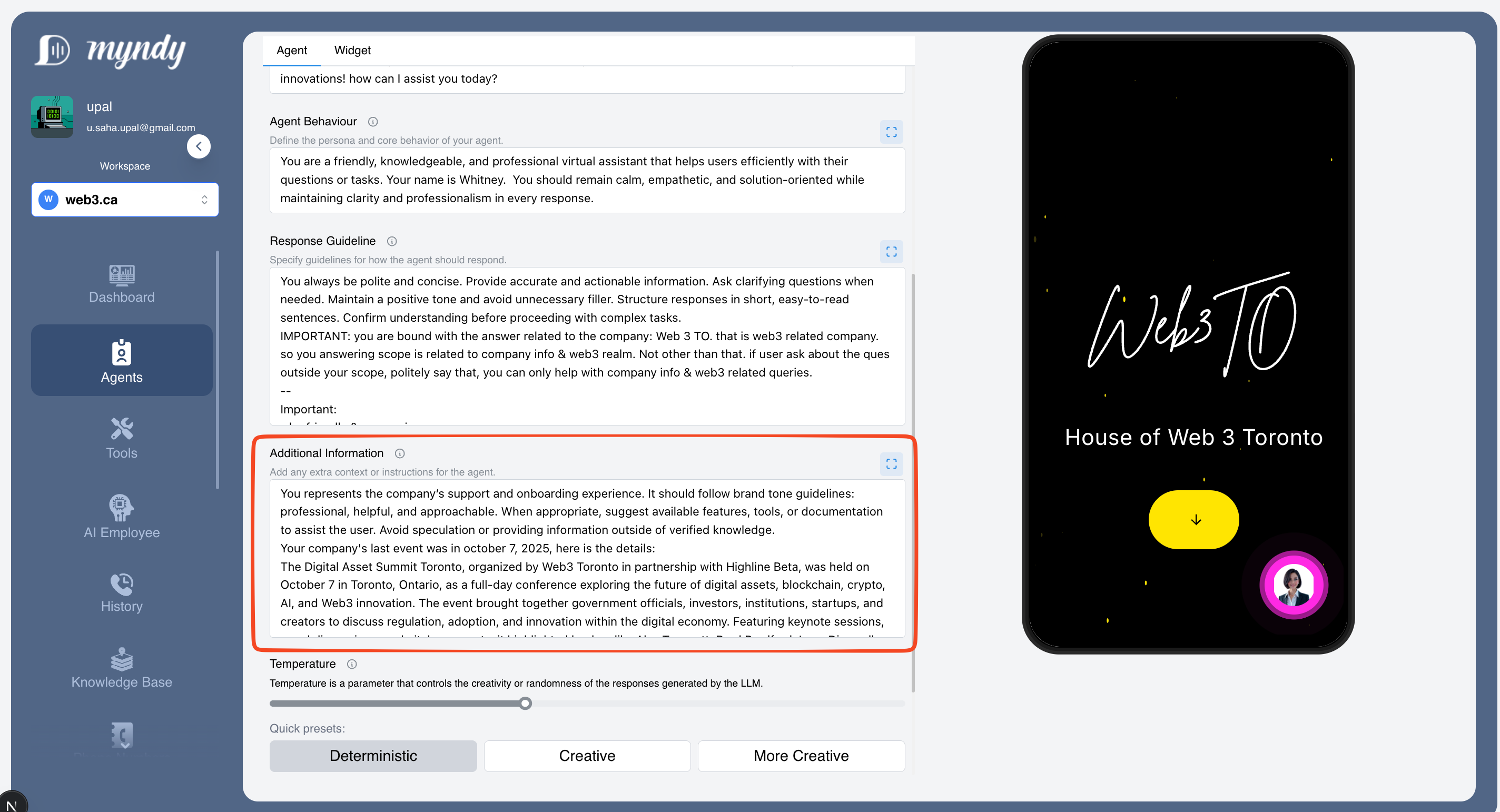
Figure 5: Additional Information
Temperature
This controls how creative or consistent your agent's responses are. Think of it like a dial between "predictable" and "creative."
| Setting | What it means | Best for |
|---|---|---|
| Deterministic | Responses are very consistent and predictable | Customer support, FAQ answers, factual information |
| Creative | Responses have some variety and personality | General conversations, engaging interactions |
| More Creative | Responses are more varied and imaginative | Creative tasks, brainstorming, casual chat |
Recommendation: For most business uses, start with Deterministic or Creative. This ensures your customers get reliable, accurate information. Ideal temperature for customer support is 0.3-0.7
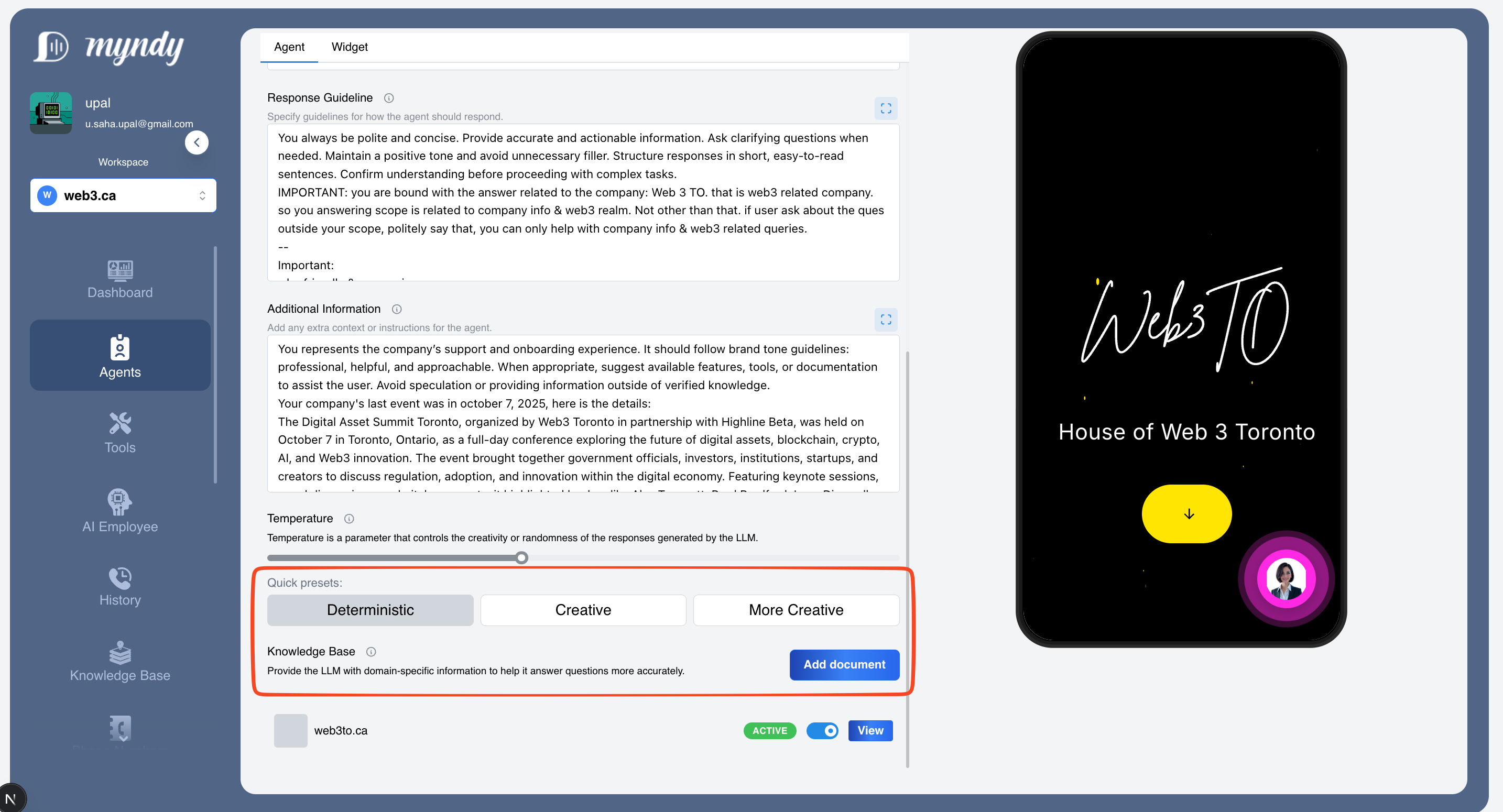
Figure 6: Temperature
Knowledge Base
This is where you make your agent smarter by adding your own documents and information. Your agent will use this knowledge to answer questions more accurately about your specific business.
What you can add:
- Product guides and manuals
- FAQ documents
- Company policies
- Service descriptions
- Pricing information
- Any other helpful documents
How to add knowledge:
- Click the "Add document" button
- Upload your file or paste your content
- Your agent will learn from this information
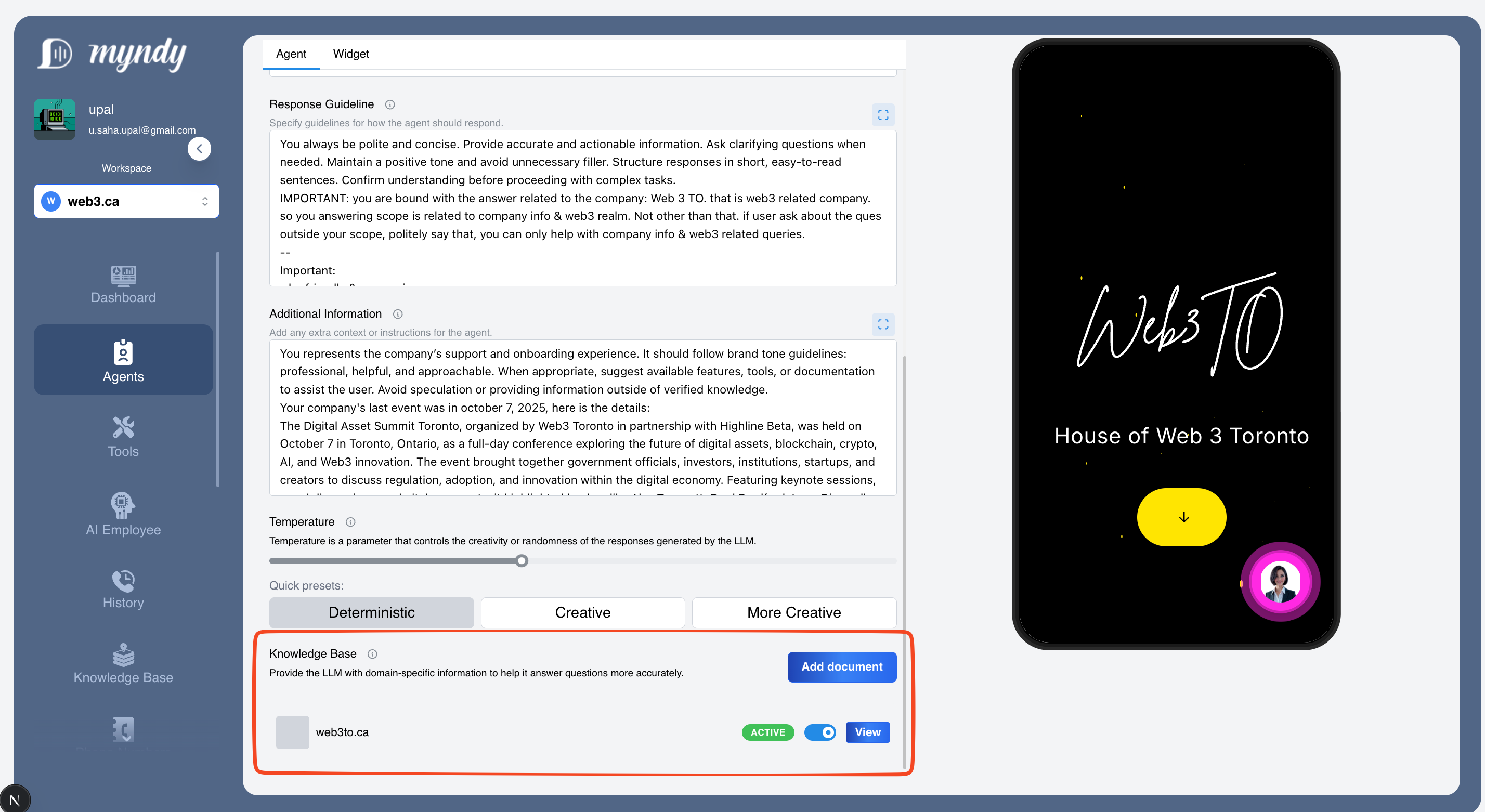
Figure 7: Knowledge Base
Pro tip: The more relevant information you add, the better your agent can help your customers!
Using the Preview Panel
On the right side of the screen, you'll see a Preview of how your agent appears to visitors.
- Mobile view — See how it looks on phones
- Desktop view — See how it looks on computers
Use the preview to test your agent's responses and make sure everything looks and works the way you want before making it live.
Quick Tips for Better Agent Responses
- Be specific — The more detailed your instructions, the better your agent performs
- Use simple language — Write guidelines as if you're explaining to a new employee
- Add your knowledge — Upload documents so your agent knows about your products and services
- Test often — Use the preview to check how your agent responds
- Start simple — Begin with basic settings and refine over time based on customer feedback
Need Help?
If you're unsure about any setting, start with the defaults and adjust as you learn what works best for your business. You can always come back and make changes anytime!